Blog
Designing the Eva-CLI Command Surface
How Eva-CLI should turn the Rust-managed runtime into a practical command-line surface with workspace setup, task execution, Agent controls, extension probes, recovery commands, and script-friendly output contracts.
Eva-CLI's architecture is intentionally strict about authority: Rust owns validation, permissions, process lifecycle, audit, and side effects, while Lua Agents express hot-reloadable behavior. The command-line tool exposes that architecture without leaking those powers directly to scripts. At the V1.5 source-release checkpoint, this surface is now executable for diagnostics, release gates, and plan-first operations.
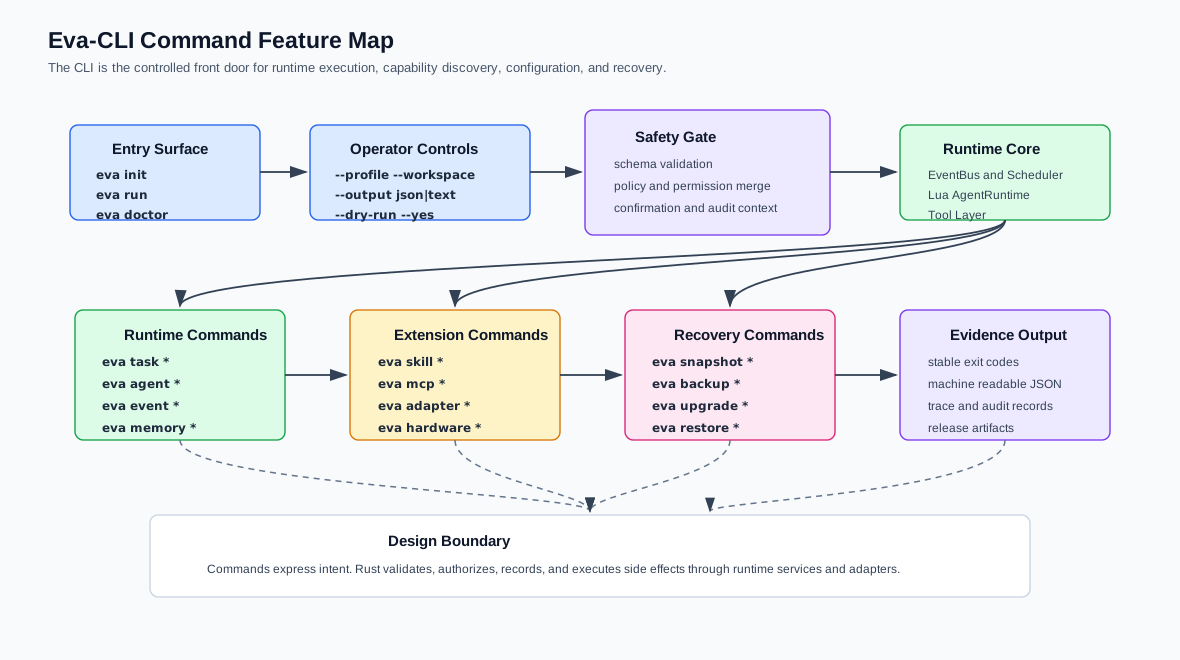
The target eva command should feel small at the entry point and disciplined under automation. A new user needs version, doctor, validation, inspect, and a first run path. A CI job needs JSON, deterministic exit codes, dry-run planning, and trace IDs. Operators need recovery and release commands that produce evidence instead of hidden mutation.
Start with one command shape
The command model should stay predictable:
eva <command> [subcommand] [flags]Global flags such as --workspace, --profile, --output json, --dry-run, --yes, --locale, and --trace should behave consistently across command groups. That consistency matters more than adding many narrow shortcuts early.
Command groups
The first usable version does not need every future capability. V1.5 now proves the runtime loop, configuration boundary, external capability diagnostics, recovery evidence, and release-hardening gates while leaving real provider execution and destructive apply paths for later releases.
| Group | Example commands | V1.5 status |
|---|---|---|
| Workspace | version, doctor, config validate, inspect; target init |
Diagnostics implemented; workspace creation remains a target command. |
| Task execution | run --example basic, task status, task logs, task cancel |
Implemented for the in-memory basic loop and local task reports. |
| Agent runtime | agent list, agent inspect, agent reload |
Target control surface; V1.5 exposes Agent data through config and inspect diagnostics. |
| Extensions | adapter list/probe, mcp list/probe, skill list/run, discovery scan |
Implemented as controlled envelopes and side-effect-free diagnostics. |
| Hardware | hardware list, hardware probe, hardware bind |
Implemented as plan-first diagnostics without raw I/O. |
| Operations | backup create, snapshot create, restore plan, upgrade check, release check/security/perf/migration |
Implemented as non-destructive evidence and release gates. |
Plan before mutation
Commands that can change runtime state should first build an execution plan. That plan should resolve the workspace, profile, runtime generation, manifests, schemas, and policy merge result before any mutation happens. In text mode, the user sees the mutation scope and confirmation prompt. In JSON mode, automation receives a plan object and a clear requires_confirmation field.
This rule is especially important for restore, upgrade, snapshot promotion, hardware binding, and any Adapter call with write permissions. The CLI can be convenient, but it must not become a quiet privilege expansion path.
Output is part of the product
Eva-CLI should treat output format as an API. Human output can use tables and recovery hints. Machine output should stay stable enough for CI and local automation.
| Result | Meaning | Automation fields |
|---|---|---|
ok |
The command completed. | status, data, trace_id |
planned |
No mutation happened; a plan is ready. | status, plan, requires_confirmation |
accepted |
Long-running work entered Runtime. | status, task_id, trace_id |
blocked |
Policy or prerequisites stopped execution. | status, error, missing |
Implementation path
The lowest-risk path is to ship the CLI in layers. Eva-CLI has followed that path through V1.5: validation and inspect came first, then the basic runtime loop, then external capability diagnostics, memory context, hardware plans, backup and lifecycle checks, and finally release-hardening gates. The next layer is not more unchecked command surface; it is signed artifacts, durable state, real provider supervision, and explicit apply gates for high-risk operations.
The full technical design is available in Command-Line Tool Feature Design.