Blog
Thoughts on EvaLauncher as Eva's Mobile Client
How EvaLauncher.com points toward a mobile Eva client built around presence, fast intent capture, runtime handoff, and explicit privacy boundaries.
EvaLauncher is already public at EvaLauncher.com as a character-first Android launcher. The site describes a Live2D companion, a floating quick-action hub, a searchable app drawer with history and folders, settings for floating behavior and language access, and a privacy policy entry. That is enough to treat EvaLauncher as more than a themed launcher: it can become the mobile surface where Eva starts to feel present.
This article is a product and runtime note, not a claim that Eva-CLI already ships a mobile runtime. The useful question is: if Eva-CLI owns long-running goals, memory, adapters, verification, and recoverable execution, what should the mobile client contribute?
The mobile client should not try to put the whole Agent runtime on the phone first. It should become a high-quality intent surface: present, fast, explainable, privacy-aware, and able to hand work to a governed runtime when a task becomes long-running or risky.
Why a launcher is a strong mobile client shape
Most assistants start from an app icon, a chat screen, or a system share sheet. A launcher has a different advantage: it is already where intent begins. The user unlocks the phone, looks for an app, checks recent activity, opens camera or messaging, and makes a quick decision. If Eva should help with real daily work, that moment matters more than another standalone inbox.
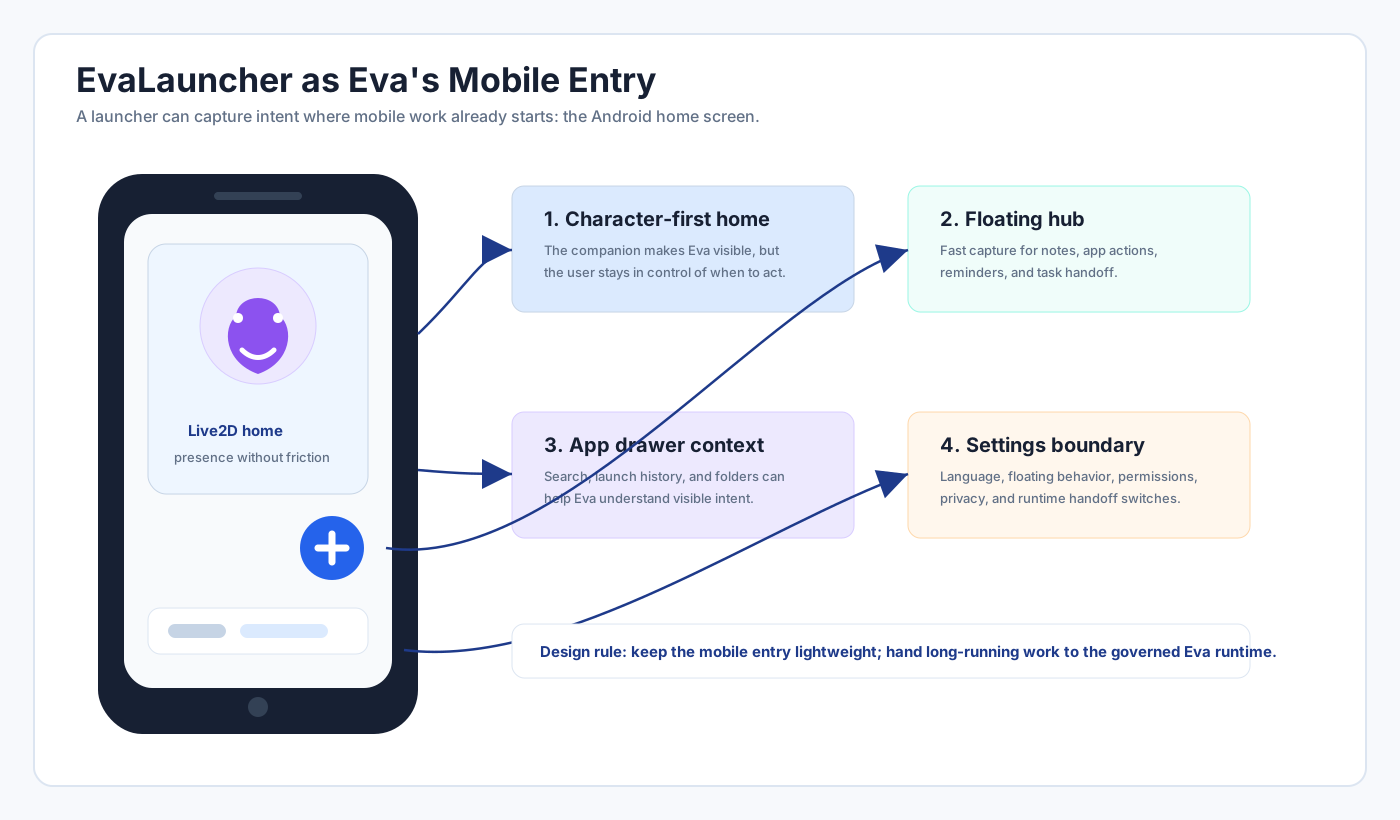
The key is restraint. EvaLauncher should not interrupt the home screen with automation theater. The Live2D companion gives presence. The floating hub gives one-tap access. The drawer keeps apps searchable and organized. Settings make sensitive behavior visible. Together, those surfaces can collect user intent with very little ceremony.
Four surfaces, four responsibilities
The current public EvaLauncher shape maps cleanly to four responsibilities. The home surface creates presence and trust. The floating hub captures quick commands. The drawer turns app selection, recent history, and folders into context. The settings surface owns explicit controls, language, floating behavior, and privacy handoff.
| Mobile surface | Best Eva responsibility | Boundary |
|---|---|---|
| Live2D home | Lightweight presence, status, and user-initiated interaction. | No hidden automation. Presence should be calm until the user asks. |
| Floating hub | Fast capture for notes, reminders, app actions, and task handoff. | Short commands stay local; risky work requires confirmation. |
| App drawer | Context about apps, recent usage, folders, and search intent. | Usage signals should be minimized and scoped to visible product value. |
| Settings | Permissions, language, floating mode, privacy policy, and sync controls. | Every cross-device or cloud behavior needs a clear switch and explanation. |
Mobile should capture intent, not own every execution
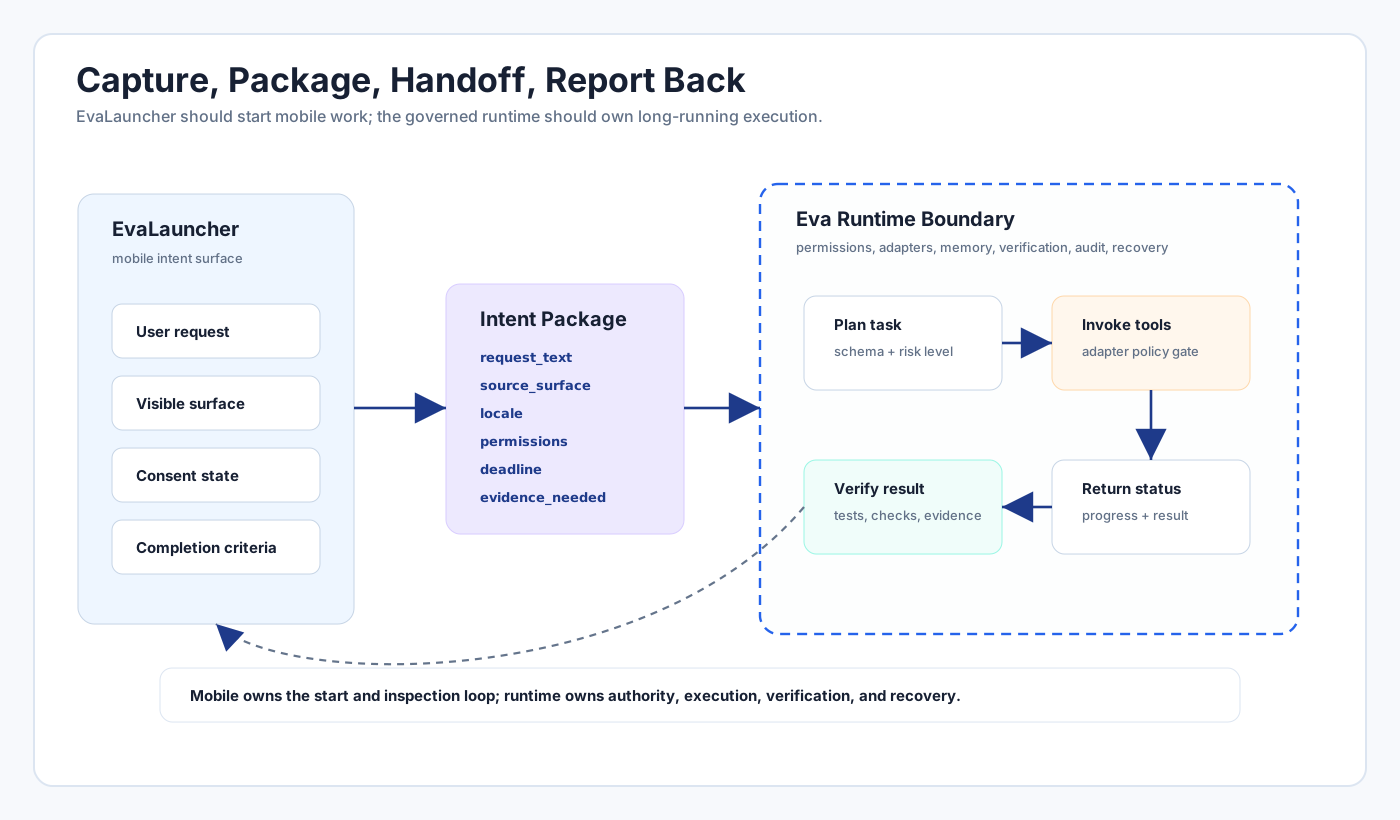
Eva-CLI's runtime direction is Rust-governed: permissions, adapters, memory, verification, release snapshots, and rollback belong to a controlled runtime boundary. EvaLauncher should respect that split. A phone is excellent at capturing intent and local context, but not every task should execute inside the launcher process.
A clean model is "capture, package, hand off, report back." The launcher gathers the user's request, active surface, optional app context, consent state, and desired deadline. The runtime turns that into a task, decides which capabilities are allowed, verifies completion, and returns a compact result. The mobile side then shows status, asks for missing confirmation, or presents the finished result.
Privacy is a product feature, not a footer
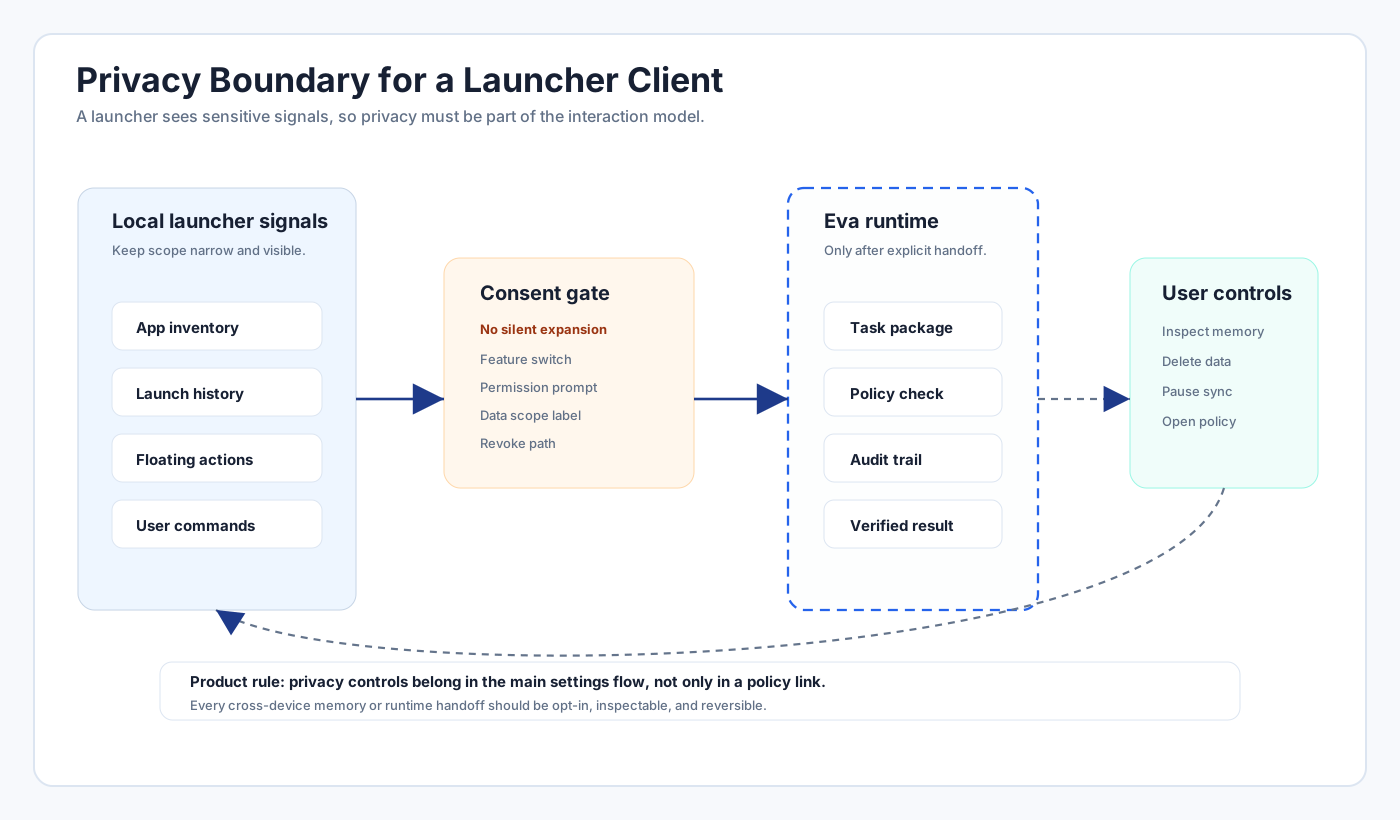
A launcher sees unusually sensitive signals: app inventory, launch history, overlays, shortcuts, language preference, and possibly user-entered commands. That makes privacy part of the core product architecture. EvaLauncher.com already exposes a privacy policy link; the next step is making privacy behavior visible inside the product flow itself.
The user should understand which data stays on device, which signals are used to shape launcher behavior, which tasks are handed to Eva runtime, and which permissions are required for each feature. Cross-device memory and cloud execution should be opt-in, inspectable, and reversible.
What to build first
The first practical milestone is not a full mobile Agent. It is a reliable intent layer: a quick capture action in the floating hub, a small task status surface, language-aware prompts, and a settings page that clearly separates local launcher controls from Eva runtime handoff controls.
The second milestone is a task bridge. The bridge should send structured packages rather than free-form transcripts: request text, source surface, optional selected app, locale, permission state, attachments if any, and user-visible completion criteria. The runtime responds with status events and evidence, not just prose.
The third milestone is memory with restraint. Mobile memory should start with user-approved preferences and reusable task context. It should avoid quietly building a surveillance profile from app usage. Eva will be more trustworthy if it asks for durable memory explicitly and makes deletion easy.
Conclusion
EvaLauncher gives Eva a better mobile shape than a generic chat app because it starts where intent starts: the home screen. Its Live2D companion can provide presence, the floating hub can capture commands quickly, the drawer can supply user-visible context, and settings can make privacy and runtime handoff explicit.
The right architecture is not "put all of Eva-CLI into Android." It is a mobile client that captures intent beautifully and hands long-running work to a governed runtime. That keeps the phone experience fast while preserving Eva-CLI's more important commitments: authority boundaries, verification, memory discipline, audit, and recovery.