Blog
Linux, Waydroid, and Eva-CLI as an Agent OS Prototype
A practical architecture for using Linux as the system base, Waydroid as a full-screen Android Launcher layer, and Eva-CLI as the Agent runtime and control plane.
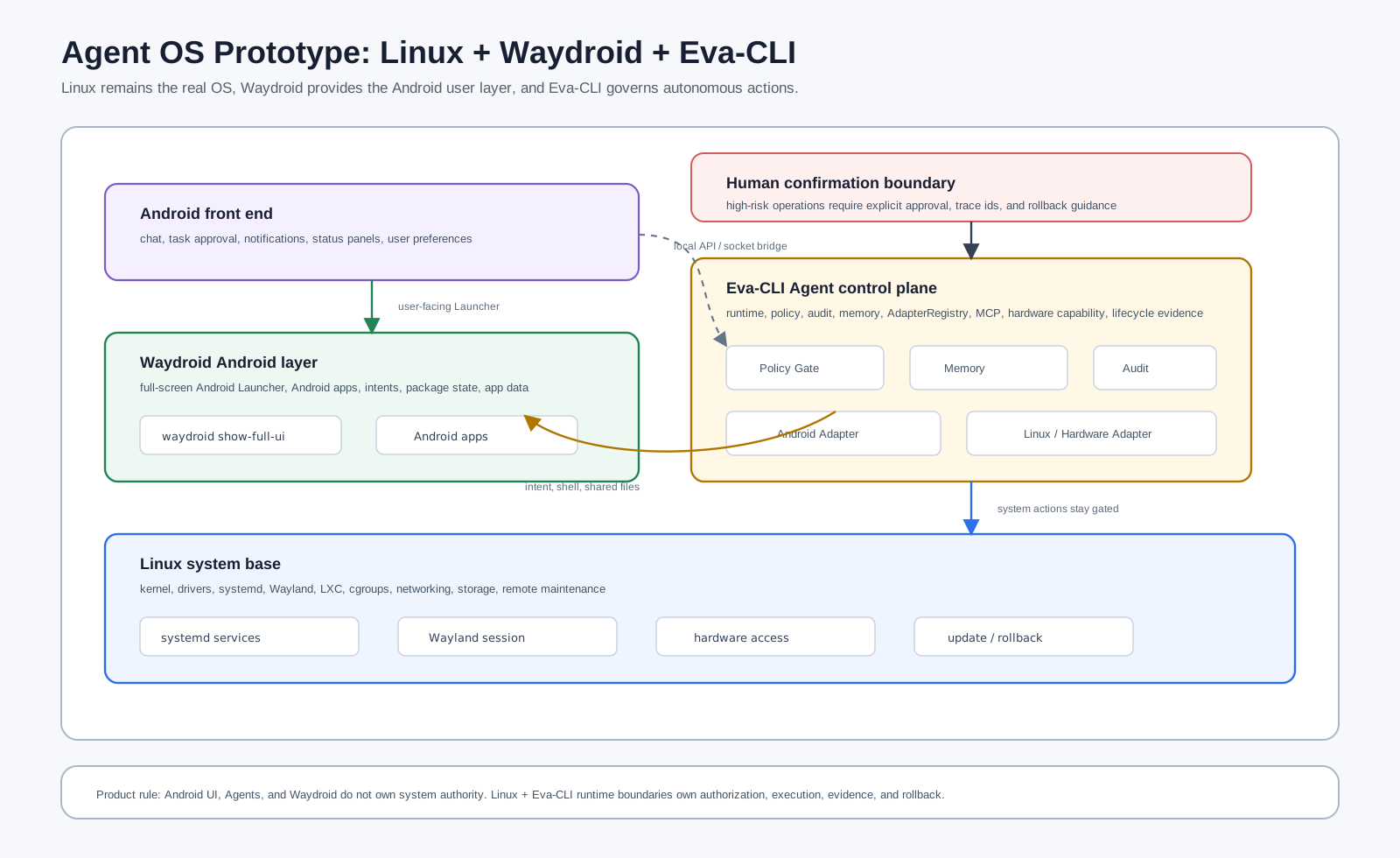
If the goal is an "Agent operating system," the practical path is not to write a new OS from scratch or trap Eva-CLI inside the Android sandbox. The cleaner architecture is Linux as the real system base, Waydroid as the visible Android Launcher and app layer, and Eva-CLI as the background Agent runtime, policy control plane, memory layer, and capability router.
This can still feel like an Android device. The machine can boot or log in directly to a full-screen Android Launcher, while Linux keeps systemd, containers, CLI tooling, drivers, remote maintenance, local models, and hardware access available. Eva-CLI should not pretend to be the kernel or the desktop shell. It should be the controlled autonomy layer inside the device.
This article is a product and architecture route, not a claim that Eva-CLI already ships a complete daemon, Android adapter, or Waydroid integration. The first thing to validate is the system layering, permission boundary, MVP interface, and compatibility limits.
Why Linux Comes First
Eva-CLI is a Rust CLI runtime with multi-Agent scheduling, Adapters, MCP, memory, hardware planning, lifecycle checks, and release evidence. Those capabilities are naturally easier to productize on Linux first. systemd can supervise services, containers and cgroups can isolate processes, and local models, CLI tools, filesystems, USB, serial, Bluetooth, and network devices can enter the same runtime boundary.
macOS remains a strong developer-experience platform, and Windows should keep CI and archive compatibility. But for a device-like, long-running, maintainable Agent OS prototype, Linux is the lowest-friction base. Waydroid then supplies the Android app and Launcher experience without requiring a custom Android ROM in the first phase.
What Waydroid Provides
Waydroid should be treated as the Android user layer, not as a Linux replacement. It runs Android on top of Linux through a container-based approach and can show a full Android UI. A Waydroid-only session can make that UI the first thing a user sees after login, often by launching waydroid show-full-ui inside a small Wayland compositor such as Cage.
[Desktop Entry]
Name=WayDroid
Exec=/usr/bin/cage waydroid show-full-ui
Type=Application
The division of labor is clear: Linux handles boot, drivers, networking, updates, logs, remote maintenance, and recovery; Waydroid handles Android Launcher, Android apps, notifications, and foreground interaction; Eva-CLI handles tasks, policy, memory, and tool calls in the background.
Where Eva-CLI Belongs
Eva-CLI should not become the Android Launcher, and it should not bypass system permissions to control everything. A better design puts Eva-CLI in the Linux service layer as the Agent control plane. It owns the Runtime, policy, audit, memory, AdapterRegistry, and lifecycle state. The Android UI is one front end, and Waydroid is one controlled capability domain.
| Layer | Responsibility | Boundary |
|---|---|---|
| Linux | Kernel, drivers, systemd, Wayland, containers, networking, storage, and remote maintenance. | The real system authority; dangerous actions require policy, confirmation, and audit. |
| Waydroid | Android Launcher, Android apps, Android intents, app data, and foreground interaction. | A containerized Android user layer, not a complete phone ROM. |
| Eva-CLI | Agent runtime, task scheduling, memory, Adapters, MCP, hardware capability, verification, and rollback evidence. | Agents express intent; the Runtime decides authorization, execution, and records. |
| Android UI | Chat, task confirmation, notifications, status panels, Launcher entry points, and user preferences. | Connects to Eva-CLI through localhost, WebSocket, a Unix socket bridge, or a controlled HTTP API. |
The Android Adapter Is The Key Interface
The product does not hinge on making an Agent click around the screen. It hinges on a stable Android Adapter. That Adapter should wrap the supported interaction points with Waydroid and Android: waydroid shell, ADB, Android intents, shared directories, clipboard, notifications, package management, foreground Activity inspection, and app-exposed APIs.
Agents should not construct arbitrary shell commands. They should request structured capabilities such as android.intent.send, android.app.open, android.file.share, android.notification.post, android.package.list, or android.activity.current. The Adapter then uses manifests, schemas, policy, user confirmation, and audit rules to decide whether and how to execute the request.
Agent request
  -> capability: android.app.open
  -> target: com.example.app/.MainActivity
  -> risk: foreground-ui-change
  -> policy gate
  -> Android Adapter
  -> waydroid shell / intent bridge
  -> audit record
The MVP
The first MVP does not need to be a complete operating system. It only needs to prove four things: the device can enter an Android-style UI, Eva-CLI can stay resident, an Android front end can exchange tasks with Eva-CLI, and an Agent can trigger a small set of controlled Android actions through an Adapter.
- Prepare a Linux distribution with Wayland, LXC, Waydroid, and required GPU support.
- Configure a Waydroid-only session so login opens the full-screen Android Launcher.
- Run Eva-CLI as a systemd service or user service, exposing only a local socket or localhost API at first.
- Build a thin Android front-end app for tasks, high-risk confirmations, logs, and Agent status.
- Implement the first
android-adapterwith app launch, intent send, file sharing, package listing, and foreground-state readback. - Add policy, trace ids, audit records, timeouts, cancellation, and rollback guidance to every operation.
The MVP should prove boundaries before it chases impressive automation. Once a user can submit a goal in the Android UI, Eva-CLI can plan the task, the Android Adapter can perform an authorized action, and the UI can display the result and audit summary, the Agent OS skeleton is real.
What Not To Promise
Waydroid is not a full phone ROM, so product claims should not assume universal Android app compatibility. Play Integrity, banking apps, strong DRM, vendor services, sensors, telephony, Bluetooth permissions, ARM app translation, and graphics acceleration can all become constraints. The product should avoid promising to replace an Android phone.
Desktop automation also needs restraint. Wayland intentionally limits global screenshots, input injection, and window control. That is useful pressure: the system should prefer explicit APIs, Adapters, and user confirmation. An Agent OS should use intents, app APIs, file exchange, and notification protocols first, and reserve visual click automation for an explicitly authorized debug mode.
How This Maps To Eva-CLI
This route fits Eva-CLI's existing architectural boundaries. eva-runtime composes the runtime, eva-policy narrows permissions, eva-adapter owns external capability calls, eva-discovery can discover Android and Waydroid capabilities, eva-memory stores long-term device preferences and experience, eva-hardware handles device and driver boundaries, and eva-lifecycle with release evidence handles upgrades, rollback, and verifiable releases.
The core principle stays the same: the Android front end does not own system authority, Agents do not own system authority, and Waydroid does not own system authority. Authority stays in the Linux and Eva-CLI runtime boundary, constrained by policy, schema, audit, backup, snapshots, and human confirmation.
Conclusion
Linux + Waydroid + Eva-CLI can form a credible Agent OS prototype. It is not a new kernel and not a patched Android distribution. It is an Agent-first Linux appliance: Linux supplies the stable system and maintenance surface, Waydroid supplies the Android user experience, and Eva-CLI supplies autonomous tasks, memory, tool calls, permissions, and audit.
The engineering difficulty is bounded, and the product boundary is clear. Build a local device that can boot, interact, audit, and roll back first. Then expand the Android Adapter, hardware capabilities, local models, and remote management. That path is more realistic than trying to ship a complete OS immediately.