Blog
LuaAgent IDE: IDEA Community Fork or IDEA Plugin?
A practical comparison of building LuaAgent tooling as an IntelliJ IDEA plugin versus a thin IDEA Community based IDE distribution, with tradeoffs, risks, and a recommended implementation sequence.
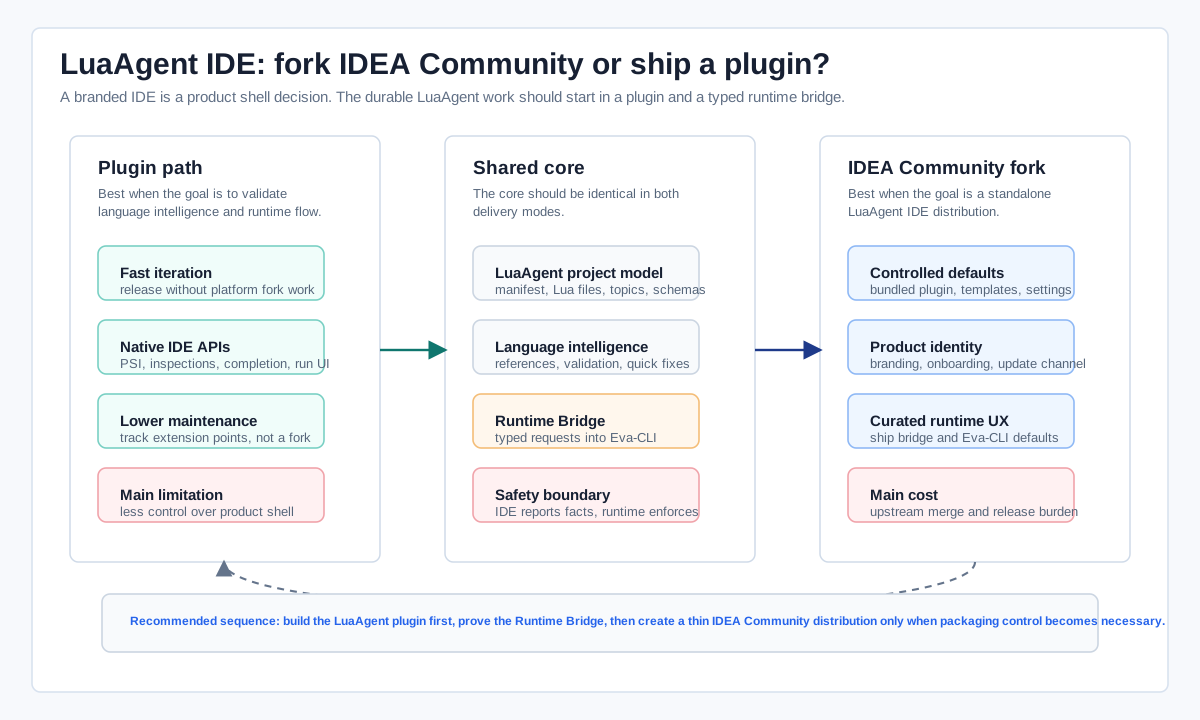
There are two reasonable ways to deliver LuaAgent tooling on top of the IntelliJ ecosystem. One is to build a normal IDEA plugin. The other is to create a branded IDE by developing a thin product distribution from IDEA Community. They are not equal-cost choices. A plugin is the right place to prove the language model, runtime bridge, inspections, completion, and daily Agent workflow. A product fork is justified only when LuaAgent needs a controlled distribution, default workspace shape, bundled runtime, and a first-run experience that cannot be expressed cleanly as a plugin.
The practical answer is therefore not "fork or plugin" as a binary decision. Build the LuaAgent plugin first. Keep it usable inside stock IntelliJ IDEA Community. Then package that same plugin inside a thin IDEA Community based LuaAgent IDE when the product needs one-click onboarding, curated defaults, and a stronger brand surface.
What Belongs In Each Route
A LuaAgent IDE needs more than syntax highlighting. It needs to understand Lua code, Agent manifests, capability schemas, EventBus topics, memory scopes, dry-run scenarios, and Eva-CLI runtime diagnostics. IntelliJ Platform extension points are a good fit for that core: file types, PSI, references, inspections, completion, run configurations, tool windows, and project model discovery can all live in a plugin.
A fork of IDEA Community should do less. It should own product-level choices: application name, icon, bundled plugin set, default settings, project templates, update metadata, marketplace policy, and distribution packaging. If LuaAgent semantics are copied directly into platform internals, every upstream merge becomes harder and the project creates a second place where Agent behavior can drift.
| Decision Area | IDEA Plugin | IDEA Community Based IDE |
|---|---|---|
| Best use | Validate LuaAgent language support, inspections, completion, run configurations, and Runtime Bridge behavior. | Ship a complete LuaAgent IDE with controlled branding, bundled defaults, templates, and onboarding. |
| Main advantage | Fast iteration, lower maintenance cost, smaller release surface, and compatibility with existing JetBrains IDE installs. | Strong product identity, predictable default environment, less setup friction, and a single packaged runtime experience. |
| Main cost | Less control over the shell, installed plugin set, first-run flow, update channel, and cross-IDE environment consistency. | Ongoing upstream merge work, larger build and release pipeline, licensing review, QA matrix, signing, and installer maintenance. |
| Risk if overused | The plugin tries to simulate a whole product and becomes cluttered with onboarding, runtime installation, and policy work. | The fork becomes thick, embeds LuaAgent behavior into platform code, and makes every IntelliJ update expensive. |
| Recommended role | The primary engineering surface for LuaAgent language intelligence and runtime integration. | A thin distribution shell that bundles and configures the plugin once the workflow is proven. |
Why Start With A Plugin
The plugin route is the shortest path to evidence. It lets the team answer the important technical questions before taking on product-fork overhead: can LuaAgent files be parsed reliably, can manifest permissions be checked before runtime, can Topic and capability references resolve across the workspace, can scenario dry runs report diagnostics inline, and can Eva-CLI remain the authority for execution?
This also matches the shape of IntelliJ Platform development. A language-aware plugin can use custom language support, parser and PSI infrastructure, references, inspections, intentions, run configurations, and tool windows without changing the IDE product itself. The LuaAgent team can test fixture projects, golden parser output, bridge contracts, and UI flows independently from the full IDE distribution.
Recommended first build
  LuaAgent plugin
    File types: agent.yaml, *.lua, *.topic, *.schema, *.scenario
    Indexing: capabilities, topics, memory scopes, runtime gates
    Editor: completion, navigation, inspections, quick fixes
    Run UI: manifest validate, scenario dry run, supervised session
    Bridge: typed requests into Eva-CLI, no raw shell execution
When A Branded IDE Makes Sense
A separate LuaAgent IDE becomes valuable when the user experience needs to be controlled from the first launch. That includes preinstalled LuaAgent tooling, a default Eva-CLI runtime location, templates for common Agent shapes, a welcome screen that opens Agent workspaces directly, and a release channel that moves with Eva-CLI rather than with the public plugin marketplace cadence.
The constraint is that the fork should stay thin. It can bundle the LuaAgent plugin, remove irrelevant default plugins, set product metadata, tune settings, provide project templates, and wire the update channel. It should not own parsing, Agent policy, Runtime Bridge behavior, or execution decisions. Those should remain in the plugin and Eva-CLI runtime so the same core works both inside stock IDEA Community and inside the branded LuaAgent IDE.
Runtime Authority Must Stay Outside The IDE
Both routes need the same safety boundary. The IDE can request facts and controlled actions, but Eva-CLI should enforce policy. That means the plugin asks for capability snapshots, manifest validation, Topic resolution, scenario dry runs, audit traces, and supervised sessions through a versioned Runtime Bridge. The editor should not build arbitrary shell commands from UI state or directly own secrets and permission checks.
This is especially important for a forked IDE because product control can make unsafe shortcuts feel convenient. The better split is simple: IntelliJ provides the editing surface, the LuaAgent plugin turns project structure into developer feedback, the Runtime Bridge carries typed requests, and Eva-CLI owns execution, permissions, EventBus delivery, adapters, memory, audit, and rollback.
Implementation Sequence
- Define the LuaAgent project model and bridge protocol before changing product packaging.
- Build the plugin inside stock IDEA Community and cover parser, PSI, references, inspections, completion, run configuration, and bridge contract behavior with tests.
- Use real LuaAgent fixture projects to verify daily workflows: create Agent, validate manifest, resolve capability, run scenario, inspect trace.
- Only after the workflow is stable, create the IDEA Community based distribution that bundles the same plugin and curated defaults.
- Keep a fork budget: every product fork patch must be classified as branding, distribution, default settings, template, or update-channel work.
That sequence keeps the highest-risk engineering work in the plugin, where it is easier to test and easier to release. The branded IDE then becomes a packaging and onboarding layer instead of a parallel implementation of LuaAgent intelligence.
Relevant upstream references: JetBrains/intellij-community, Custom Language Support, Plugin Configuration File, and Run Configurations.