Blog
Designing a LuaAgent IDE on IDEA Community
How to build a LuaAgent-focused IDE by reusing the open-source IntelliJ IDEA Community codebase, keeping the product fork thin, and putting language intelligence into a controlled plugin and runtime bridge.
A LuaAgent IDE should not be treated as a skinned text editor. LuaAgent development combines Lua code, Agent manifests, runtime capabilities, Topic events, memory contracts, and verification results. That shape makes IntelliJ IDEA Community a practical base: keep the IDE fork thin, put language behavior in a plugin, and connect runtime execution through an explicit bridge instead of letting the editor become another script host.
JetBrains describes the IntelliJ open-source repository as the open-source part of the JetBrains IDE codebase and the basis for IntelliJ Platform development. That gives this plan a mature editor, project model, indexing system, VCS integration, run configuration framework, and extension-point model before we write LuaAgent-specific code.
Thin fork, strong plugin
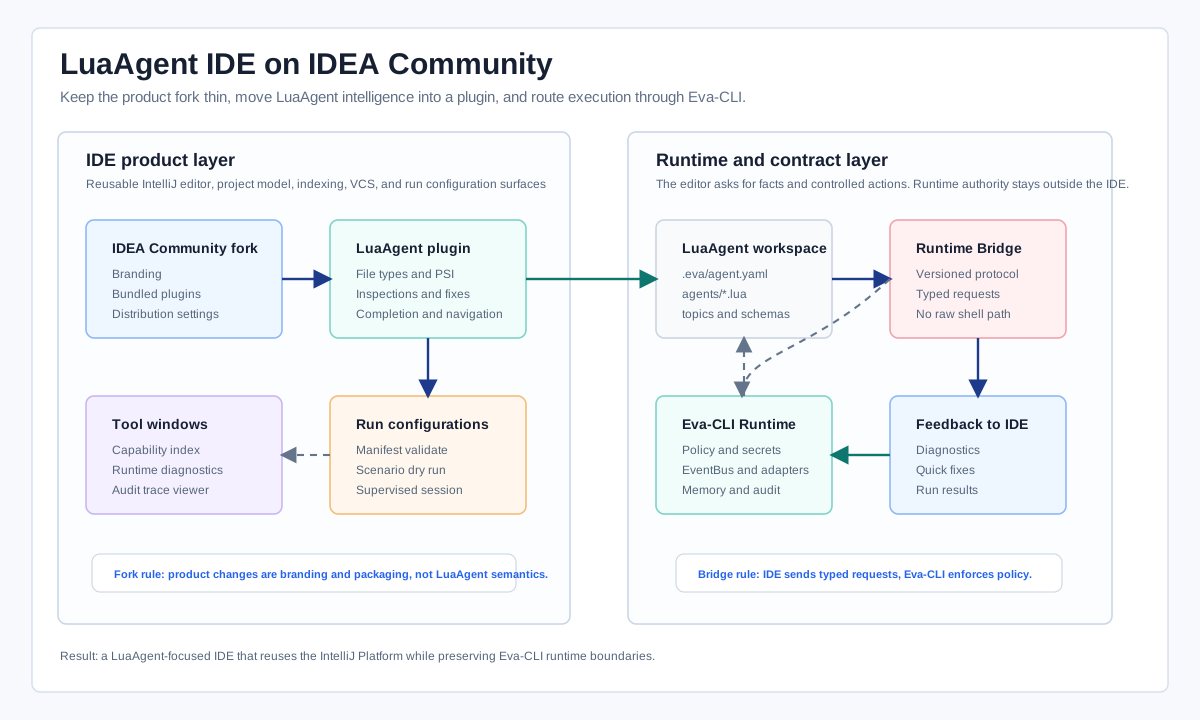
The first architectural decision is to separate product ownership from language ownership. The IDEA Community fork owns branding, bundled plugins, default settings, project templates, update channels, and distribution packaging. The LuaAgent plugin owns file types, syntax, PSI, references, inspections, completion, structure view, run configurations, and runtime panels.
This split matters because a fork of the IDE platform is expensive to maintain. Every product-level change has to survive upstream platform movement. A plugin can evolve faster, can be tested independently, and can remain compatible with the IntelliJ Platform extension model.
| Layer | Owns | Should avoid |
|---|---|---|
| IDEA Community fork | Branding, default plugins, product metadata, bundled templates, distribution shape. | Embedding LuaAgent semantics directly into platform code. |
| LuaAgent plugin | Language model, editor intelligence, inspections, run configurations, tool windows. | Raw process execution, secrets access, filesystem mutation outside IDE APIs. |
| Runtime bridge | Typed requests to Eva-CLI, diagnostics, dry runs, capability index snapshots, test results. | Bypassing policy with direct shell snippets from the editor. |
| Eva-CLI Runtime | Policy, permissions, Agent execution, EventBus, adapters, memory, audit, rollback. | IDE UI state or editor-only assumptions. |
Language support starts with PSI
IntelliJ language features are built by combining language-independent platform services with language-specific pieces. For LuaAgent, the minimum language surface is not just Lua syntax. It also needs Agent declarations, manifest keys, capability names, Topic names, memory scope declarations, tool schema references, and runtime constraints.
The plugin should define LuaAgent files around stable program structure: lexer, parser, PSI elements, stub indexes where needed, references and resolve, inspections, quick fixes, and completion contributors. JetBrains' Custom Language Support documentation frames this exact path through parser and PSI implementation, lexer definition, syntax highlighting, navigation, completion, inspections, and refactoring hooks.
LuaAgent project model
  .eva/agent.yaml          -> Agent identity, permissions, runtime gates
  agents/*.lua             -> Agent behavior and host API calls
  capabilities/*.schema    -> tool input/output contracts
  topics/*.topic           -> EventBus topic declarations
  tests/*.scenario         -> dry-run and harness scenarios
A pragmatic first version can support existing Lua files plus LuaAgent sidecar files. The IDE can then add richer cross-file resolution: agent:emit("runtime.task.started") resolves to a Topic declaration, host.call("memory.query") resolves to a capability contract, and a manifest permission warning appears before the runtime rejects the call.
The runtime bridge is a safety boundary
The IDE should never become the authority for Agent execution. It should ask the runtime for facts and controlled actions: list available capabilities, validate a manifest, run a dry-run scenario, request diagnostics, start a supervised Agent session, or open an audit record. Eva-CLI remains the place that owns policy, permissions, secrets, adapters, EventBus delivery, memory, and rollback.
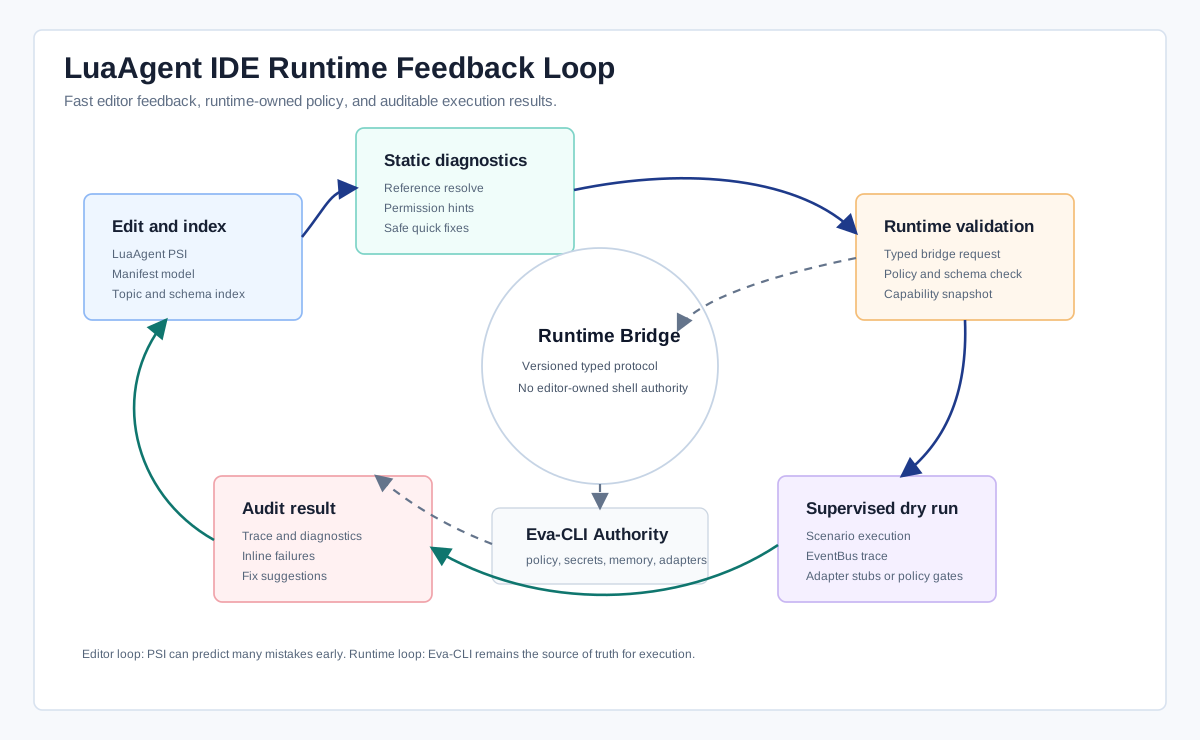
The bridge can be deliberately small. A local Eva-CLI process exposes a versioned protocol with typed methods such as runtime.capabilities.snapshot, agent.manifest.validate, agent.scenario.dryRun, event.topic.resolve, and audit.trace.open. The IDE plugin turns those responses into editor diagnostics, gutter actions, run results, and navigation targets.
What the first usable IDE should include
The MVP should be biased toward daily Agent design work, not platform novelty. The first release should open a LuaAgent workspace, recognize Agent manifests, index capabilities and Topics, highlight unsafe host API calls, provide completion for capabilities and event names, run a supervised dry run, and show runtime diagnostics inline.
- Create a branded IDEA Community distribution with the LuaAgent plugin bundled and nonessential default plugins trimmed.
- Implement file types and project model discovery for
.eva/agent.yaml, Agent Lua files, Topic declarations, schema files, and scenario tests. - Build lexer, parser, PSI, references, completion, navigation, structure view, inspections, and quick fixes for the LuaAgent layer.
- Add a runtime bridge that talks to Eva-CLI through typed requests and never executes arbitrary editor-provided commands.
- Add run configurations for manifest validation, scenario dry run, supervised local Agent session, and audit trace opening.
- Lock behavior with plugin tests, fixture projects, parser golden files, and bridge contract tests.
Keep upstream movement survivable
The long-term success of a LuaAgent IDE depends on how little has to be carried as a product fork. Avoid editing platform internals for anything that can be implemented through extension points. Keep branding and distribution changes isolated. Treat the LuaAgent plugin as the main product surface. Treat the runtime bridge as a contract, not an implementation shortcut.
Relevant upstream references: JetBrains/intellij-community, Custom Language Support, Grammar and Parser, and Lexer and Parser Definition.